
How to Turn Your Help Center into a 24/7 AI Support Agent
Your help center already contains the answers. This guide shows how to convert it into a conversational AI agent, close the gap between deflection and real resolution, and measure whether it is working.

Stan
@stan

Most businesses with a help center have already done the hard part: the answers are written, organized, and published. What they have not done is make anyone read them. Customers overwhelmingly want self-service, 88 percent want a self-service portal option and 92 percent are open to using a knowledge base, yet the same customers file tickets for questions the help center already answers, because finding an article and reading it is more work than asking.
The fix is not writing more articles. It is changing the interface: taking the help center you already maintain and putting a conversational AI agent in front of it, one that reads the whole knowledge base and answers the visitor's exact question in seconds, at any hour. This guide covers why static help centers underperform, what the data says about how much an AI layer actually absorbs, and the five steps to make the conversion, using content you already have.
The Deflection Gap: What the Numbers Really Say
Deflection rate, the share of incoming questions resolved without a human agent, is the standard measure of self-service success, and the 2026 benchmarks are instructive. Production data compiled by ClarityArc puts the enterprise median at 41.2 percent for tier-1 queries, with the top quartile reaching 58.7 percent and the bottom quartile stuck at 22.4 percent.
Tier-1 Ticket Deflection Benchmarks, 2026
Share of tier-1 support queries resolved without a human agent across enterprise AI support deployments.
Source: ClarityArc 2026 production benchmarks for tier-1 query deflection in enterprise AI support deployments.
The more uncomfortable number comes from Gartner: AI layers deflect more than 45 percent of queries, but only about 14 percent reach genuine self-service resolution, meaning the customer got their answer and never came back. The gap between those numbers is mostly content quality. An AI agent in front of a thin, outdated help center deflects by frustrating people into leaving; the same agent in front of a complete, current help center deflects by actually answering. Everything in this guide is aimed at landing on the right side of that distinction.
Why the Static Help Center Underperforms
A help center makes the reader do the work of a support agent: translate their problem into search keywords, choose among ranked articles, read one, and map its general instructions onto their specific situation. Each step sheds users. The pattern is the same one that makes FAQ pages lose to chatbots: static content answers the question it was written for, not the question that was asked.
A conversational agent inverts the work. The visitor asks in their own words ("my invoice shows two charges"), the retrieval layer finds the relevant passages across every article at once, and the model composes a direct answer with the article as its source. Nobody browses categories. And unlike your support team, it does this at 3 a.m., which matters because round-the-clock response is now the baseline expectation, not a differentiator.
| Static help center | Help center + AI agent | |
|---|---|---|
| Visitor effort | Search, choose, read, interpret | Ask one question |
| Coverage per query | One article at a time | Every article at once |
| Answer specificity | Generic, article-level | Composed for the exact question |
| Availability | Always up, rarely used | Always up, actually used |
| Content maintenance | Required | Identical, same source content |
| Handles the unanswerable | Dead end | Escalates or captures contact |
The last two rows are the strategic point: the AI agent does not replace the help center or add a second content pipeline. It reuses the investment you already made, which is why this is usually the highest-leverage AI project a support team can run.
Step 1: Audit the Content First
The agent will be exactly as good as the help center behind it, so spend an hour on the content before touching any tools:
- Pull the last 50 to 100 real support tickets and check each against the help center. Every question with no covering article is a gap the AI will inherit.
- Flag stale articles. Old screenshots, renamed features, and retired policies become confident wrong answers once an AI starts quoting them.
- Kill contradictions. If two articles disagree about the refund window, a human might notice the dates; a retrieval system just picks one.
The list of gaps becomes your writing queue, and the standard is simple: your help center should cover the questions a chatbot should answer instantly, because those are the ones customers actually ask.
Step 2: Crawl the Help Center
Point your chatbot platform at the help center and let it ingest the published articles. In Paperchat this is the Website option in the chatbot's Sources tab: paste the help center's URL, and the crawler walks the linked pages, extracts the article text, and trains on it.
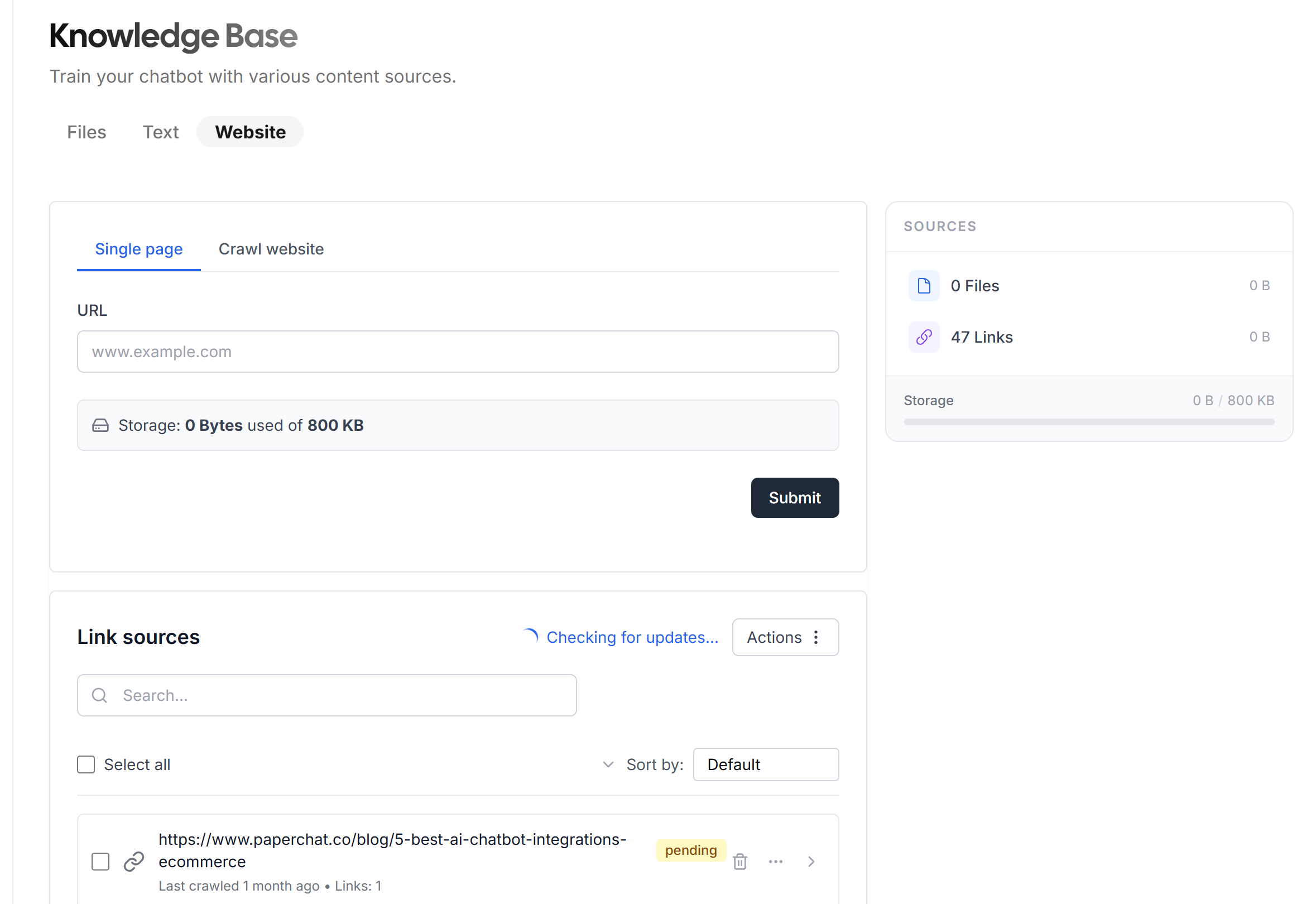
Two configuration notes worth getting right on the first crawl:
- Scope the crawl to the help section (for example
/help/*or the support subdomain) so navigation pages, marketing pages, and legal text do not dilute the knowledge base. - Crawl the article pages, not the category index. The index lists titles; the articles hold the answers.
Step 3: Add What the Help Center Leaves Out
Help centers document the product; support conversations also draw on material that never gets published, internal troubleshooting runbooks, plan comparison sheets, policy PDFs. Upload those alongside the crawl so the agent sees what your agents see. Format matters here, and the mechanics of training on PDFs, Word documents, and spreadsheets are covered in a companion guide. For one-off facts with no natural document, most platforms accept pasted text directly.
Step 4: Decide What Happens at the Edges
The difference between a deflection statistic and a resolution statistic is what happens when the agent cannot answer. Configure it deliberately:
- Escalation to a human during staffed hours, with the conversation transcript attached so the customer never repeats themselves. Setting up AI-to-human handover properly is its own topic, but the default rule is simple: frustration signals, billing disputes, and anything legal go to a person.
- Contact capture outside staffed hours, so the unanswerable question becomes a ticket with context rather than an abandoned session.
- Honest refusal for out-of-scope topics. An agent that says "I do not have information on that" preserves trust; one that improvises destroys it.
Step 5: Keep the Agent Synced with the Source
The help center keeps evolving after launch, and the agent must evolve with it. Set the crawl to re-run on a schedule, daily or weekly depending on how often you publish, so the knowledge base never drifts from the published articles. The failure mode of an unsynced agent, quoting last quarter's pricing page with full confidence, and the mechanics of automatic content syncing are documented separately.
Measuring Whether It Works
Track four numbers from the first week:
- Deflection rate: share of conversations resolved with no human involvement. The benchmarks above give you the scale: past 41 percent is above the enterprise median, past 58 percent is top-quartile territory.
- Resolution quality: of deflected conversations, how many customers returned with the same issue within 48 hours. This is the Gartner gap made visible.
- Unanswered questions: every "I do not know" is a content gap, and collectively they are the most honest content roadmap your team will ever get.
- Ticket volume trend: the number the CFO cares about. Well-executed conversions land meaningful reductions, through the same mechanisms covered in how chatbots reduce ticket volume.
The Bottom Line
A help center is a library; customers wanted a librarian. Converting one into a 24/7 AI support agent is mostly a redeployment of work already done: audit the articles, crawl them, add the unpublished documents, define the escalation edges, and keep the sync running. The platforms make the mechanical part a one-afternoon job, and the benchmarks make the target concrete: a majority of tier-1 questions answered before a human ever sees them, from content you had all along.
More Articles
AI Chatbot vs. FAQ Page: Which Handles Customer Questions Better?
A research-backed comparison of AI chatbots and FAQ pages across resolution rates, user experience, SEO value, and cost - including when to use each and how to combine them.
April 12, 2026
How to Train an AI Chatbot on PDFs, Docs, and Spreadsheets
A practical guide to turning the documents your business already has into chatbot knowledge, which file formats extract cleanly, why spreadsheets are the hard case, and how to prepare files that answer well.
July 1, 2026